
Reminders that know what your books know
Connect QuickBooks Online, read only, or upload an aged receivables report from any accounting software. Your agent sees who owes what and what's overdue, so reminders stop when an invoice is paid and credit limits use real balances.
Your books say paid. Your reminder says otherwise.
Wholesale buyers pay by bank transfer, cheque and card, and the payment is recorded in your accounting software, not in Shopify. So a buyer who paid last week gets a reminder this week, and a buyer who owes a lot looks fine when the next order comes in.
- 1Willow & Co. paid by bank transfer on Tuesday and got a “friendly reminder” on Thursday.
- 2Pine Hollow owes $3,400 in your books. Nothing in Shopify says so.
- 3Before approving a big order, you open your accounting software to see what they owe.
- 4Your bookkeeper sends an aged receivables report every Monday, and it sits unread in your inbox.
From today to handled.
- 01
Connect or upload
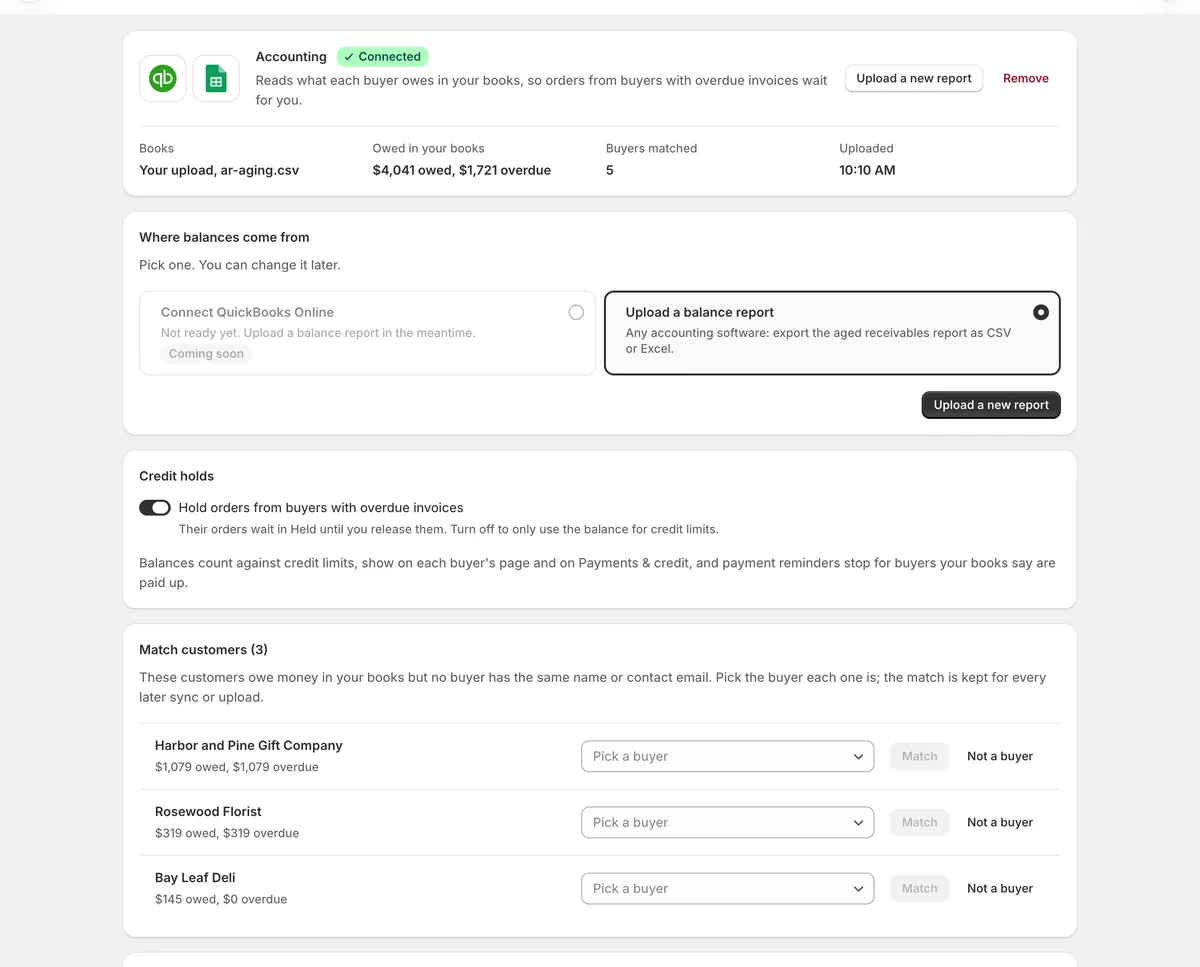
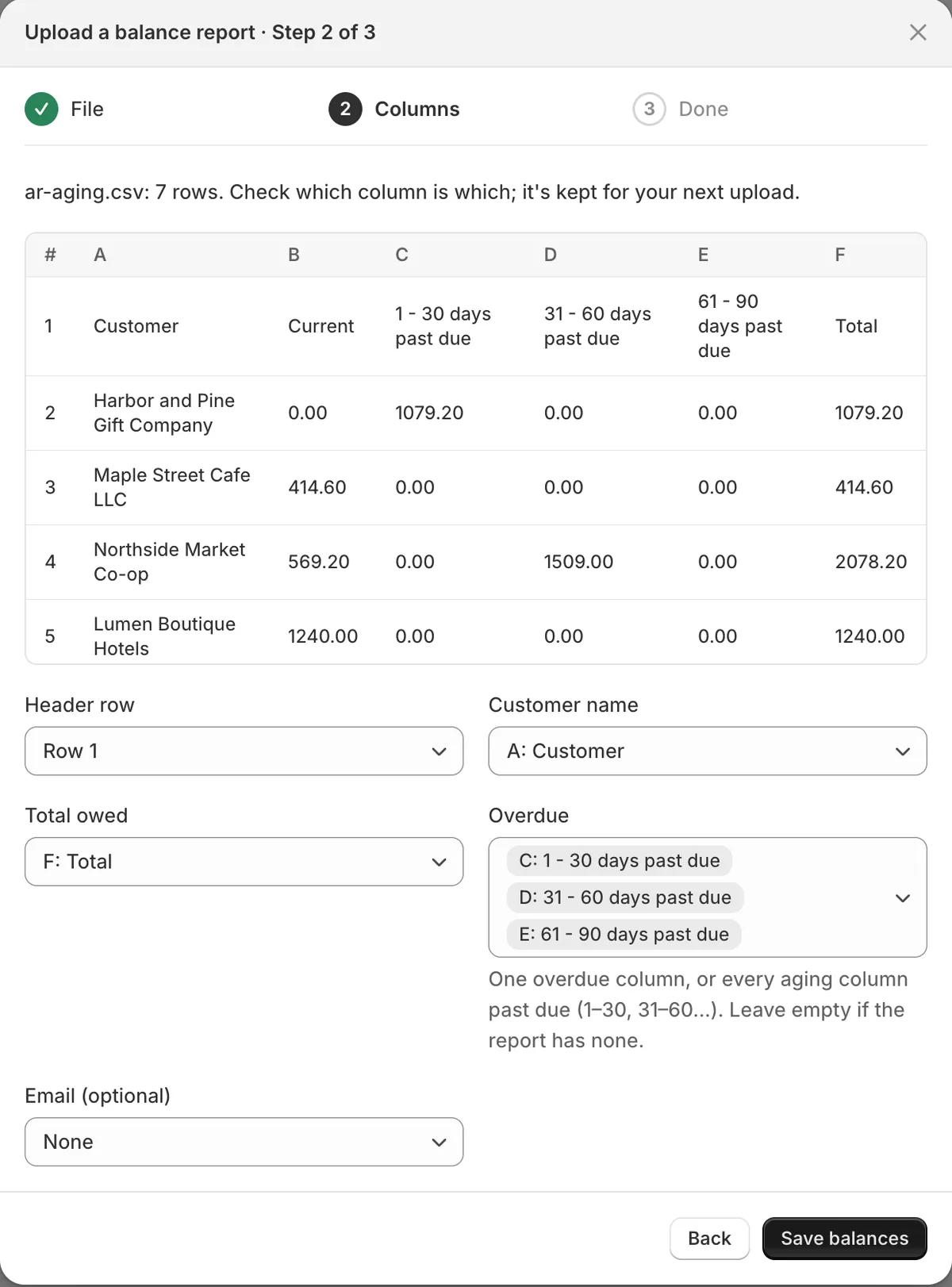
Sign in to QuickBooks Online, or upload an aged receivables report (CSV or Excel) from any accounting software.
- 02
Match your customers
Each customer in your books is matched to a buyer. Check the matches once and fix any that are off.
- 03
Balances come in
What each buyer owes and what's overdue show on their buyer page and on Payments.
- 04
Everything uses them
Credit limits, holds and payment reminders work from the balances in your books.
The real screen, step by step
This is the app on our demo store. Click a number, or let it play.
The details that make it work.
- QuickBooks Online
Connect with your QuickBooks sign-in. It reads customers and open invoices, and never writes anything.
- Any accounting software
No QuickBooks? Export an aged receivables report from your accounting software and upload it.
- Customers matched to buyers
Matched for you, with a list to check and correct before the balances are used.
- Owed and overdue on each buyer
The balance from your books on the buyer's page, next to their orders and credit limit.
- Credit limits with real balances
Available credit counts what your books say they owe, not only what Shopify knows.
- Reminders that stop on paid
When your books say an invoice is paid, the reminders for it stop.
- Payments page totals
Owed, overdue and on hold, with your books' balances included.
- Disconnect any time
Disconnect and the balances it read are cleared.
- Pine Hollow · $1,240Second reminder sentFirmer, still friendly
- Willow & Co. · $412Promised to pay FridayReminder paused until then
- The Little Shop · $96Paid this morningThanked them
What Shopify gives you, and what we add.
- Knows about payments taken through Shopify.Also knows about payments recorded in your books, like bank transfers and cheques.
- An Overdue label on orders with payment terms.What each buyer owes and what's overdue, from your books.
- No credit limit for B2B buyers.Credit limits checked against real balances.
You stay in charge
- Read only: nothing is ever written to your books.
- Your agent never marks an order as paid in Shopify.
- Disconnect at any time and the balances it read are cleared.
Common questions
Which accounting software works?+
Does it change anything in QuickBooks?+
What if a customer's name doesn't match the buyer?+
Does it replace my accounting software?+
Send us a real order. We'll show it to you done.
We're opening to our first wholesale brands soon. Join early access and founding members get 50% off any paid plan for 12 months, from their second bill.