
Keep your email. Your agent reads it.
Forward orders to your agent's own address, sign in with Google or Microsoft, or connect any other mailbox with an app password. Your agent reads every order where it already lands, and answers from the address your buyers know.
Orders land in five inboxes, none of them the app's
Wholesale orders arrive wherever buyers happen to send them: the shared orders@ address, the owner's Outlook, a rep's Gmail. A tool that needs its own inbox means one more place to watch, and buyers who keep writing to the old one anyway.
- 1Your orders@ address lives with your web host, and every app you try only works with Gmail.
- 2A buyer replies to last month's invoice email with this month's order, straight to the owner's Outlook.
- 3Someone copies each PO out of the inbox and into Shopify before lunch, every day.
- 4Questions to buyers go out from a no-reply address, and their answers go nowhere.
From today to handled.
- 01
Pick how it gets your mail
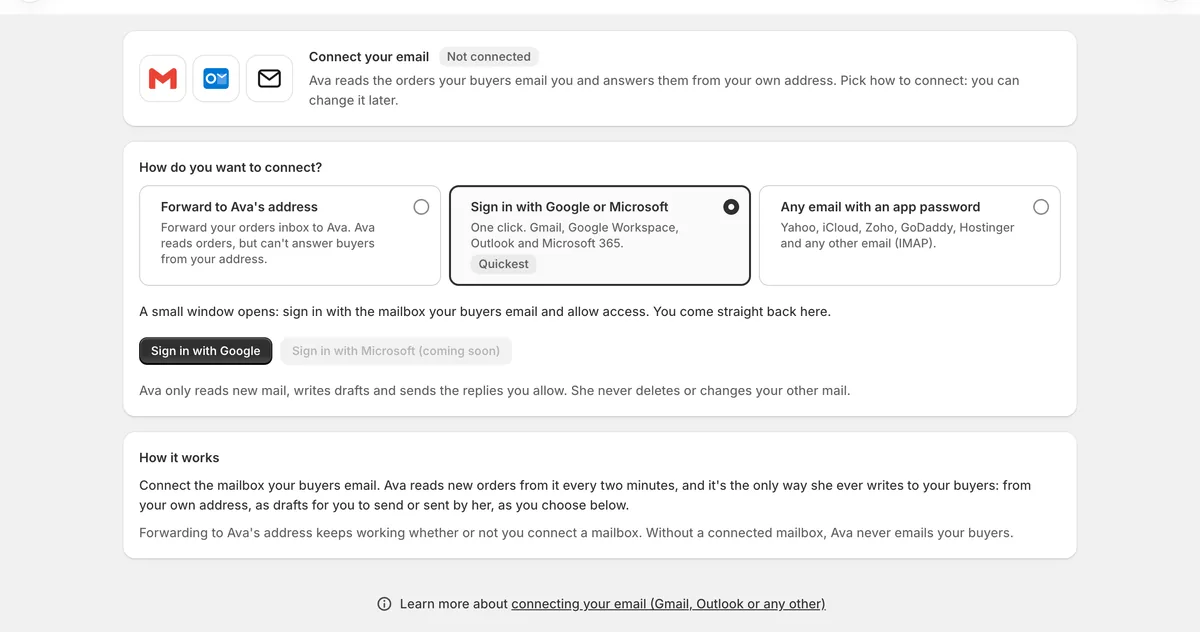
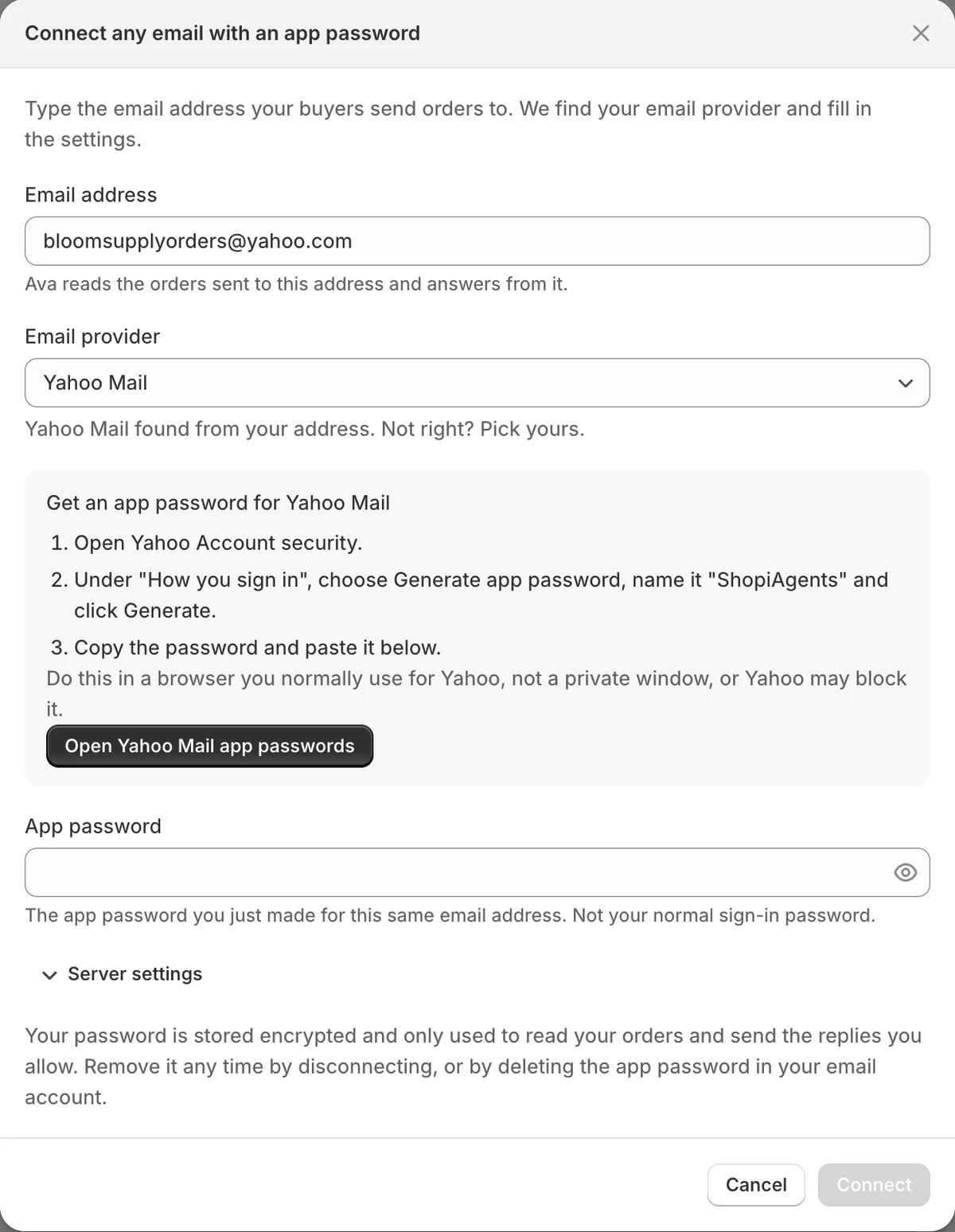
Forward or CC orders to your agent's own address, sign in with Google or Microsoft, or type your email address and an app password.
- 02
It checks the connection
Before anything is saved, it makes sure it can read and send, and tells you in plain words if something needs fixing. For most providers the server settings fill in for you.
- 03
It reads the orders
PDFs, spreadsheets, photos and the email itself, from the folder you choose. Every order is checked like any other.
- 04
Replies from your address
Questions to buyers, confirmations and reminders wait as drafts in your mailbox, or go out from your address when your rules say so.
The real screen, step by step
This is the app on our demo store. Click a number, or let it play.
The details that make it work.
- Its own order address
Forward or CC orders to an address like bloomsupply@wholesale.shopiagents.com. Works with any email provider.
- Gmail and Google Workspace
Sign in with Google and your agent reads orders where they already arrive.
- Outlook and Microsoft 365
Sign in with Microsoft to connect an Outlook or Microsoft 365 mailbox.
- Any other email
Yahoo, iCloud, Zoho, GoDaddy, Hostinger or any mailbox with IMAP, connected with an app password.
- Drafts or sent
On Suggest, replies wait in your Drafts folder. On Do it, they go from your address with a copy in Sent.
- The folder you choose
Point it at the folder your orders land in, and tell it which senders to skip.
- Checked every few minutes
New mail is picked up within a couple of minutes, so an order is ready while the buyer still remembers sending it.
- Passwords kept safe
App passwords are stored encrypted and never shown again. If one stops working, you're asked for a new one.
- 4 orders ready to approveOak & Fern, Harbor Goods, Maple Street, The Little Shop
- 1 price to checkA trimmer priced at $9.00, list says $7.50
- Order status sent to Willow & Co.Answered as your store, with tracking
- Net 60 request from NorthsideWaiting for you: they've paid on time 9 times
- Friendly reminder sent to Pine HollowFrom your mailbox, in your words
What Shopify gives you, and what we add.
- Orders that arrive by email stay in your inbox.Orders are read from the mailbox they already land in, whichever provider it is.
- Draft orders typed in by hand from each email.Each order email becomes a checked draft order for you to approve.
- Customer emails from your store's notification address.Questions, confirmations and reminders from your own mailbox, signed by your store.
You stay in charge
- Your agent reads only the folder you choose. Disconnect at any time.
- On Suggest, every reply waits as a draft until you send it.
- Buyers only ever hear from your address, signed with your store's name.
- You never share your main email password: an app password can be removed from your provider at any time.
Common questions
Which email providers work?+
What is an app password?+
Will it send emails on its own?+
Do my buyers need to change anything?+
Send us a real order. We'll show it to you done.
We're opening to our first wholesale brands soon. Join early access and founding members get 50% off any paid plan for 12 months, from their second bill.