
Every buyer on the right price list, without the tags
Sort buyers into customer groups like Gold or Distributors by rule, not hand-kept tags. Each group has its own price list. Approve a wholesale application and the buyer lands on the right price list automatically.
Price levels kept alive by memory and tags
Most brands have tiers: cafés, shops, distributors, the big accounts that earned a better price. In practice that means tags someone adds by hand, a spreadsheet of who's on what, and buyers who grew into a better tier a year ago and never moved.
- 1Harbor Goods spent $14,000 with you this year and is still on the starter price list.
- 2A new distributor is approved on Friday and orders on Monday at café prices.
- 3Someone renames a tag and forty buyers quietly drop back to retail.
- 4A buyer asks why their price went up in March, and nobody can say who changed it.
From today to handled.
- 01
Make your groups
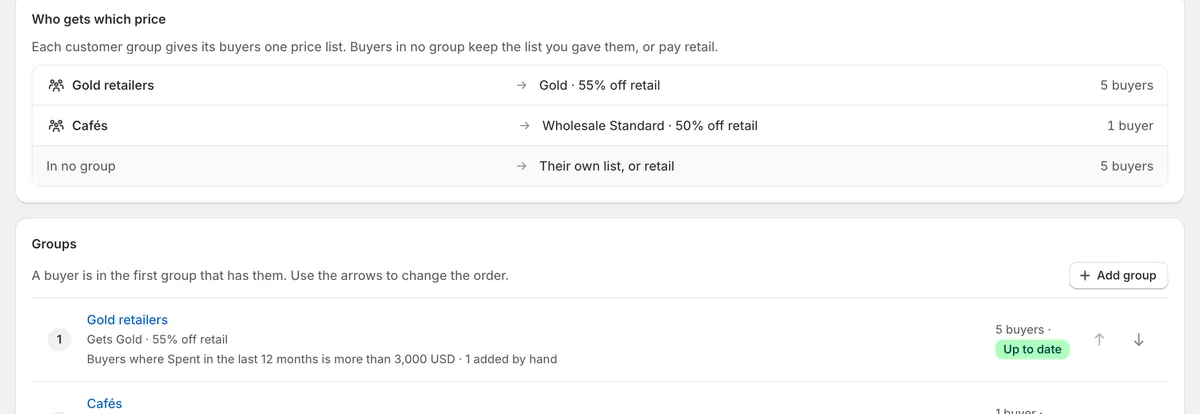
Gold, Distributors, Cafés: each group gets one price list, an existing one or a new one at a % off.
- 02
Set the rules
Shopify customer tags, country, spend or orders in the last 12 months, lifetime spend, months as a buyer, business type, yearly sales or any application answer.
- 03
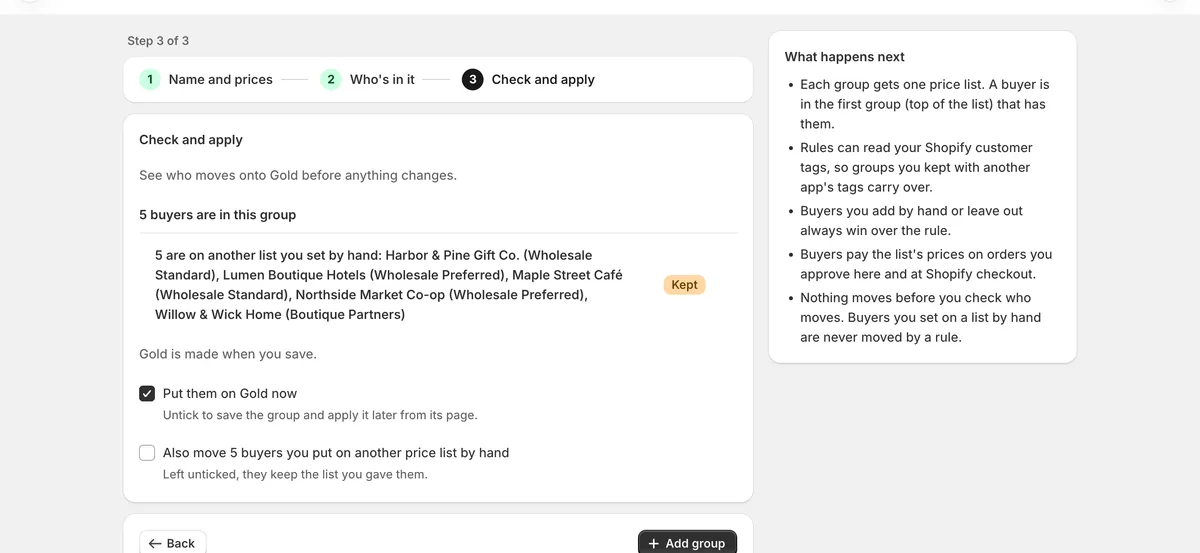
Check the preview
See exactly which buyers move before anything changes. Buyers you placed by hand are never moved by a rule.
- 04
It keeps itself up to date
New and approved buyers land on the right price list, and every buyer is checked again each night.
The real screen, step by step
This is the app on our demo store. Click a number, or let it play.
The details that make it work.
- Customer groups
As many as your business needs, each with its own price list. The first group a buyer matches wins.
- Rules in plain terms
Tags, country, recent or lifetime spend, number of orders, months as a buyer, source, business type, yearly sales or any answer on their application.
- By hand, or left out
Put a buyer in a group yourself, or keep them out of every rule. Rules never move a buyer you placed by hand.
- Preview before saving
Who moves, from which group to which, before a single price changes.
- Right price on approval
Approve a wholesale application and the buyer is on the right price list straight away.
- Checked every night
A buyer who grows into Gold moves up without anyone remembering to do it.
- Your tags carry over
Coming from a tag-based wholesale app? Your Shopify customer tags work as rules from day one.
- Full price history
Every change on every price list: before and after, who made it, and how (the editor, a CSV, a group or your AI agent).
What Shopify gives you, and what we add.
- Price lists you assign to each company location by hand.Customer groups assign the right price list for you, by rule.
- Customer tags you add and keep up to date yourself.Tags can drive the rules, alongside spend, country, business type and application answers.
- Catalog changes apply as soon as you save.A preview of who moves before anything changes, and a full history after.
You stay in charge
- Nothing moves until you've seen the preview and saved.
- Buyers you placed by hand stay where you put them.
- Prices stay Shopify's own, so what buyers see on your store matches their orders.
- Every price change is on record, with who made it and how.
Common questions
I use tags from another wholesale app. Do I start again?+
What if a buyer matches two groups?+
Will a rule ever move a buyer I set by hand?+
Can I see who changed a price?+
Send us a real order. We'll show it to you done.
We're opening to our first wholesale brands soon. Join early access and founding members get 50% off any paid plan for 12 months, from their second bill.