
A standing order is great until the café closes for a week, or needs double for a festival. A heads-up email tells the buyer what's about to be ordered a few days before, with buttons to skip this one, change it or pause. You hear about it in the app, and the order follows their answer.
Who can do it: editors and up.
Before you start
- The buyer needs a standing order. See Standing orders.
- Heads-ups go out from your own email. See Connect your email.
Turn it on
- Go to Growth → Reorder schedule and pick Standing orders in Show:.
- At the top, under Heads-up emails to buyers, choose when it goes in Send it: 1, 2, 3, 4, 5 or 7 days before. This applies to every standing order.
- On each standing order, switch on Send the buyer a heads-up before each order.
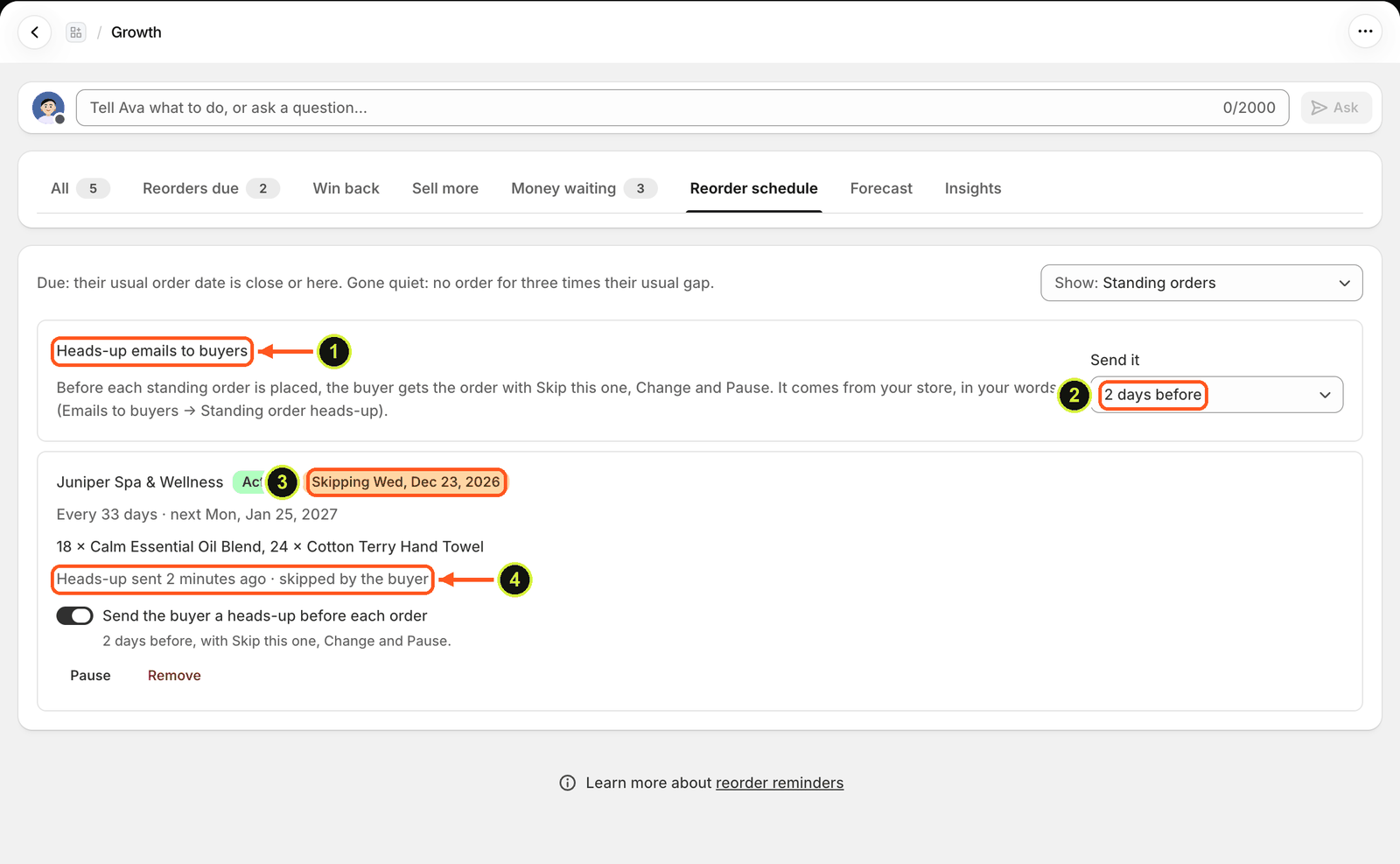 Growth → Reorder schedule, Show: Standing orders: Heads-up emails to buyers, and an order the buyer is skipping
To change the wording, go to Wholesale store → Emails to buyers → Standing order heads-up.
What your buyers see
An email from your store, signed with your store's name:
Hi Sam, A quick heads-up: your regular order is set to go on Wed, Dec 23: 48 × Lavender candle Total: $576.00 Nothing to do if it's right. If you need a change this time, use the buttons below. Skip this one · Change · Pause
- Skip this one: the order for that date isn't placed. The next one goes as usual.
- Change: a page with their products. They set quantities (0 leaves a product out) and click Save the changes. Keep these changes for future orders makes it stick; left unticked, only this order changes.
- Pause: no more orders are placed until they or you start it again. They can reply to any of your emails when they want it back.
Each link works once.
What you see
On the standing order:
- Heads-up sent with when it went, and what the buyer did.
- Skipping [date] when they skipped one.
- Changed by the buyer for [date] when they changed one.
- Paused by the buyer when they paused it. You're also told.
- The last few answers, like "Dec 2: skipped by the buyer" or "changed by the buyer (kept for future orders)".
To start a paused order again, click Resume.
Good to know
- With the switch off, nothing is sent and the standing order runs as before.
- Prices are never frozen. Each order uses the buyer's prices on the day.
- The order still lands on your desk to check and approve, like every standing order.
If something goes wrong
- No heads-up went out: check the switch is on for that standing order, and that your email is connected.
- The buyer says the link expired: they can reply to the email instead, and you change the order yourself.