
Your agent works like a member of your team you message. She writes to you in one conversation: her morning brief, what needs you, what she did. You write back in plain words, the way you would to a colleague. On any page, the Ava button shows what she noticed there and answers questions about it.
Who can do it: everyone on your team can read the conversation and ask questions. Buttons that act need the role for that action (approving an order needs Approver or Admin).
In the app your agent is called Ava by default; you can rename her.
Where to find her
- Messages: her conversation is pinned first, above your buyers and sales reps. On Buyers, click Messages.
- Home: the first quick link. It reads Ava with "2 new from Ava" when she has written, or Message Ava when it's quiet.
- Every main page: the Ava · 3 button in the page header opens a panel about that page (below).
What's in her conversation
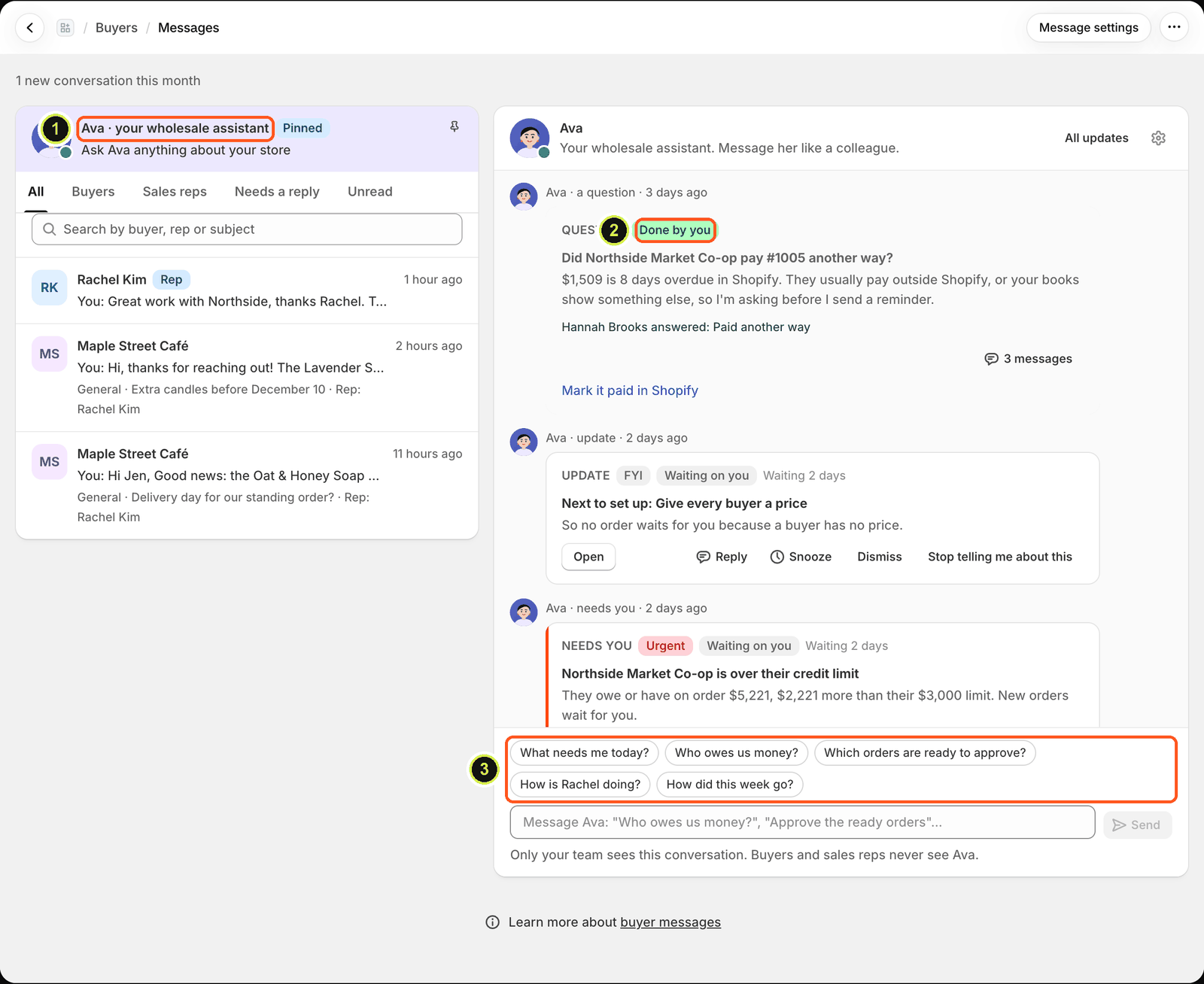 Messages with Ava's conversation open: her morning brief and update cards with their buttons
Newest at the bottom, like any chat:
- Her morning brief, at the time you set for it: money, orders, buyers, applications and stock. See Your daily briefing.
- Her updates, each as a card with its buttons: something that needs you, a question, an alert or just news. For example "PO 4471 from Oak & Fern is ready" with Approve, or "Did Northside Market pay #1005 another way?" with its answers. See Your agent's updates.
- What she did on her own under your rules.
- Your messages and her answers.
Opening the conversation marks it read for you. Show earlier loads older messages.
Ask her a question
Type in the box at the bottom and press Send. For example:
- "Who owes us money?"
- "Which orders are ready to approve?"
- "How is Rachel doing this month?"
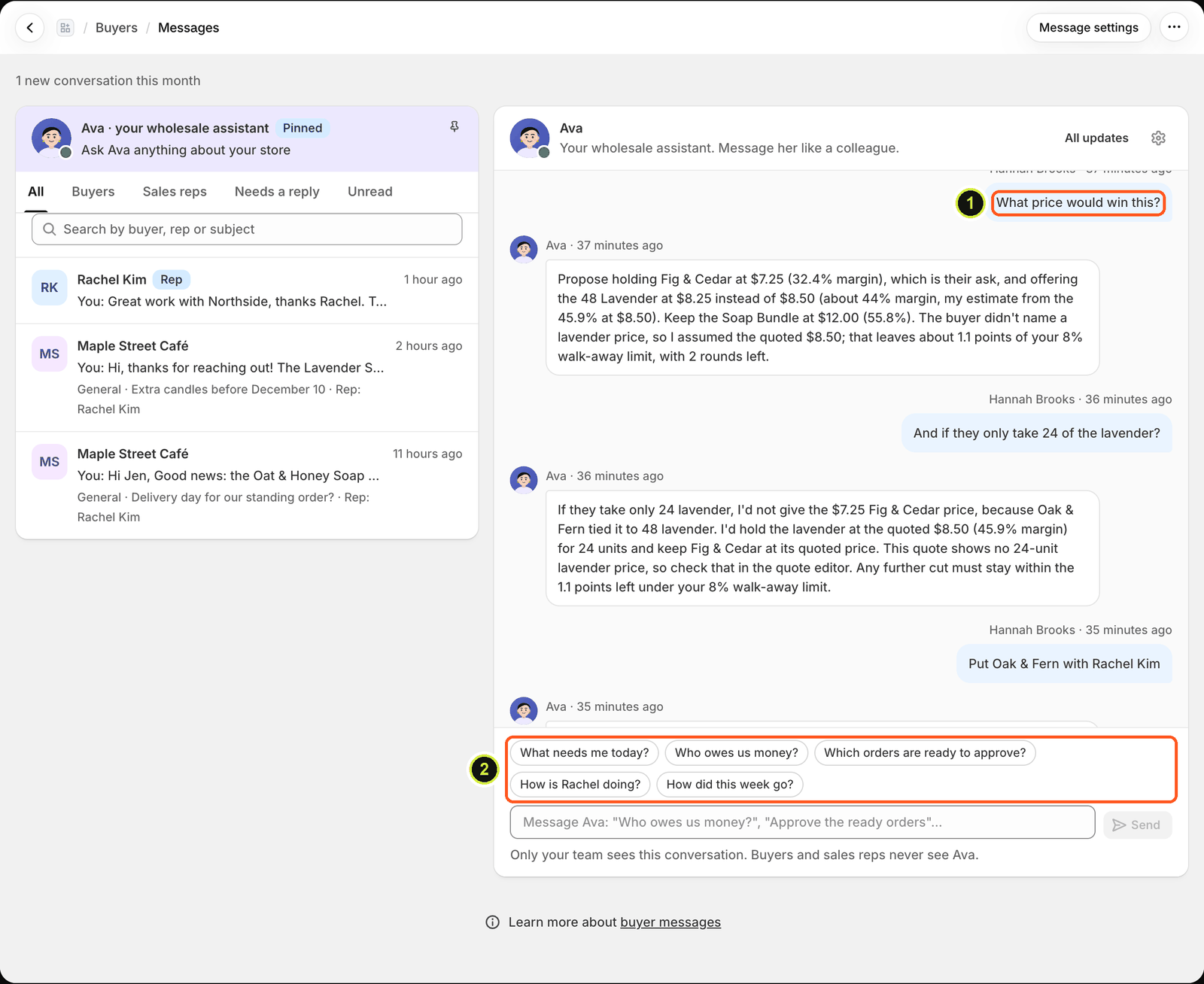 A question answered in Ava's conversation, with suggested questions by the box
She answers from your store's own records. When the answer lives on a page, she adds a button to open it. When you don't know what to ask, pick one of the Suggested questions by the box, such as What needs me today? or Who is due to reorder?
When she offers to do something
Ask for a job ("Approve the ready orders", "Send Northside Market a reminder") and she doesn't just do it. She replies with what she would do and a button that names the action, with "You'll be asked to confirm first."
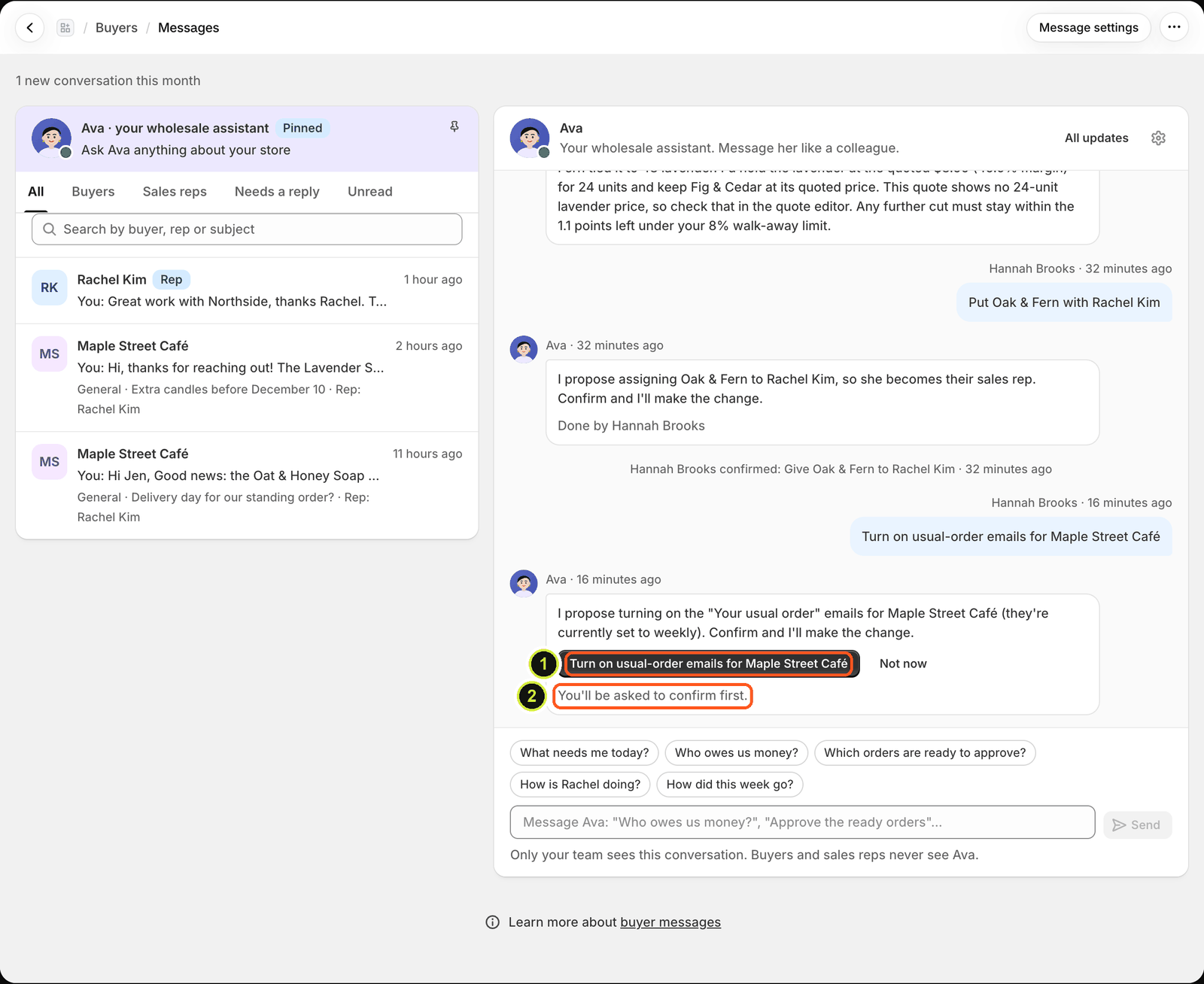 Ava proposes an action with a button and "You'll be asked to confirm first"
- Click the button, for example Approve 3 orders.
- A window says what will happen and to whom. Click the action to confirm, or cancel.
Nothing happens without that OK. If you'd rather not, click Not now. The conversation then notes who confirmed or said not now, so your team can see what was decided.
The Ava button on every page
Every main page (Orders, an order, Buyers, a buyer, Payments, Accounting, Quotes, a quote, Prices, Sales reps, Applications and more) has one button in its header: Ava · 3. The number is how many suggestions she has for that page. With none, it just reads Ava.
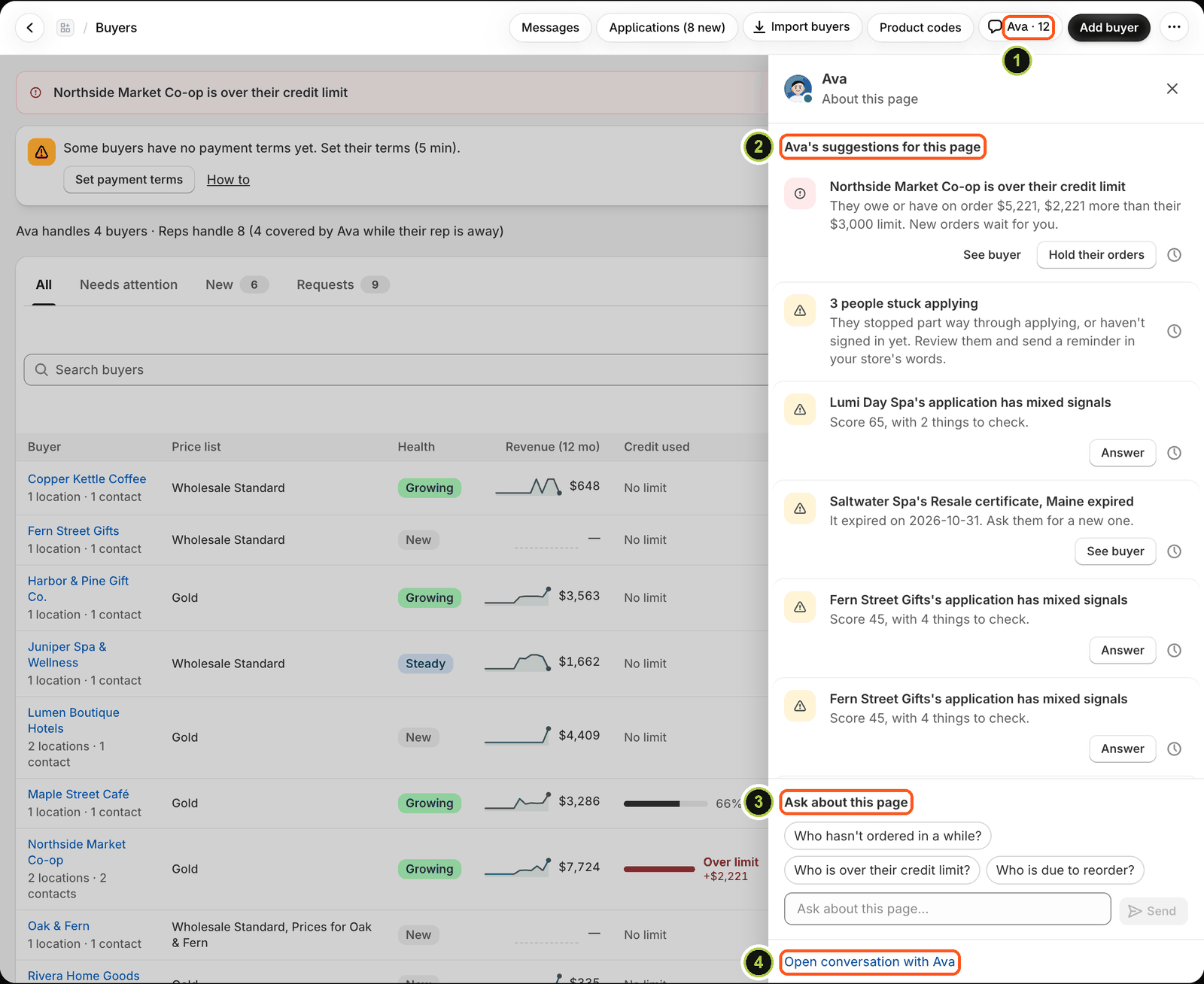 The Ava button in the Buyers page header and the panel with this page's suggestions
Click it and a panel opens on the right:
- Ava's suggestions for this page: what she noticed here, such as "Harbor Goods has gone quiet" with Send a reorder reminder. Each has its buttons and a clock to snooze it.
- Ask about this page: questions that fit the page you're on, and a box for your own. On an order: "Why is this order stuck?" On a buyer: "How is this buyer doing?" On Payments: "What's overdue the longest?"
- Open conversation with Ava takes you to the whole conversation in Messages.
Questions you ask in the panel are saved in her conversation, so you can find the answer later.
Ask about a quote
On a quote she answers from the quote itself and from how you negotiate. Ask "What price would win this?" and she gives real prices for each line, within your negotiation limits, with the margin on each.
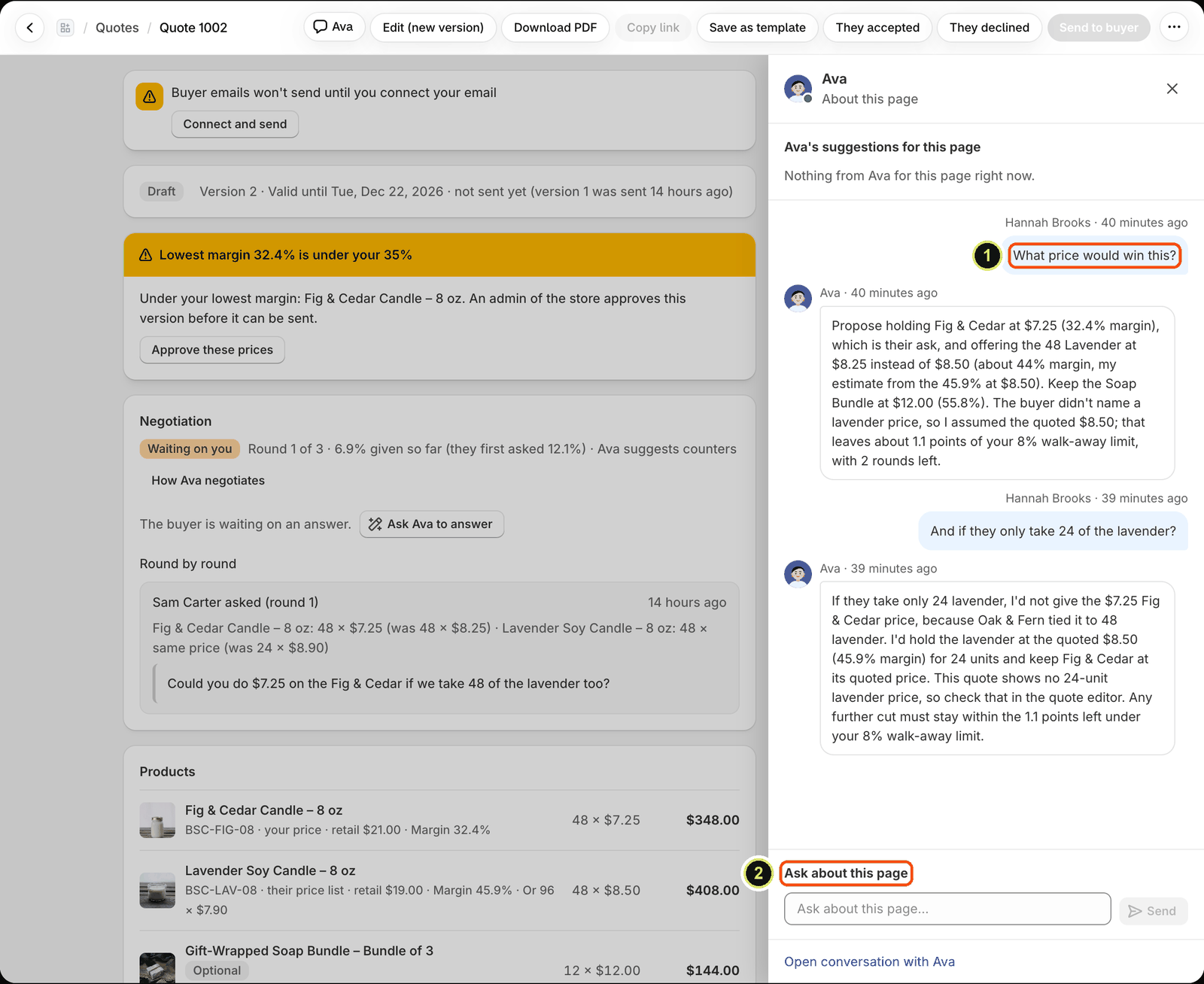 The panel on a quote: "What price would win this?" answered with prices and margins
See How Ava negotiates quotes.
Urgent things stay on the page
Only something urgent, such as an order over a buyer's credit limit or an order on hold, stays on the page itself: one slim red line with its main button, and Ava · 2 more to open the rest in the panel.
Who sees it
Only your team sees this conversation. Buyers and sales reps never see Ava. When she writes to a buyer, it comes from your store. When your team writes to a sales rep, it's signed as your store's team.
Good to know
- The same updates, two ways. Her conversation and the Updates tab on her page hold the same updates. Answer one in either place and it closes in both. See Your agent's updates.
- Other places to ask. You can also email her from your own address, or ask from Claude, ChatGPT or Shopify Sidekick. See Email your agent.
If something goes wrong
- A button is greyed out. Your role doesn't allow that action. See Users and permissions.
- She can't answer. Ask in other words, or open the page and look there. Some answers need the AI switched on (Ava → Rules, at the bottom). See Privacy, AI and customer data.