
A buyer gets your quote and writes back: "Can you do $9.50 on the candles?" Your agent can answer that for you, inside limits you set. It gives a little less each round, asks for something in return, never goes under your floor, and asks you about anything past your limits. Every round is on the quote, so you can see what was offered and why.
Who can do it: everyone can see the Negotiation card. Admins change how your agent negotiates. Admins and approvers send counters, as they send quotes.
In the app your agent is called Ava by default; you can rename her. Buyers never see her: every reply goes from your store, signed by your store.
When a buyer asks for a better price
Buyers ask in two ways: Ask for changes on the quote's page, or a reply to your quote email. Either way the quote moves to the Negotiating tab on Quotes, with a badge such as "Waiting on you · round 2", and your agent works out an answer:
- Their price is within your rules: she agrees to it.
- It's more than this round allows, but above your floor: she counters at this round's price, and may offer a bigger quantity at a better price.
- It's under your floor, or asks for other terms (Net 60, free shipping, a delivery date), or the rounds are used up: she asks you, with her best counter ready.
What happens next depends on how you set her up: she prepares the counter for you to send, or sends it herself (see Off, Suggest or Do it).
The Negotiation card
Open the quote. The Negotiation card shows where things stand.
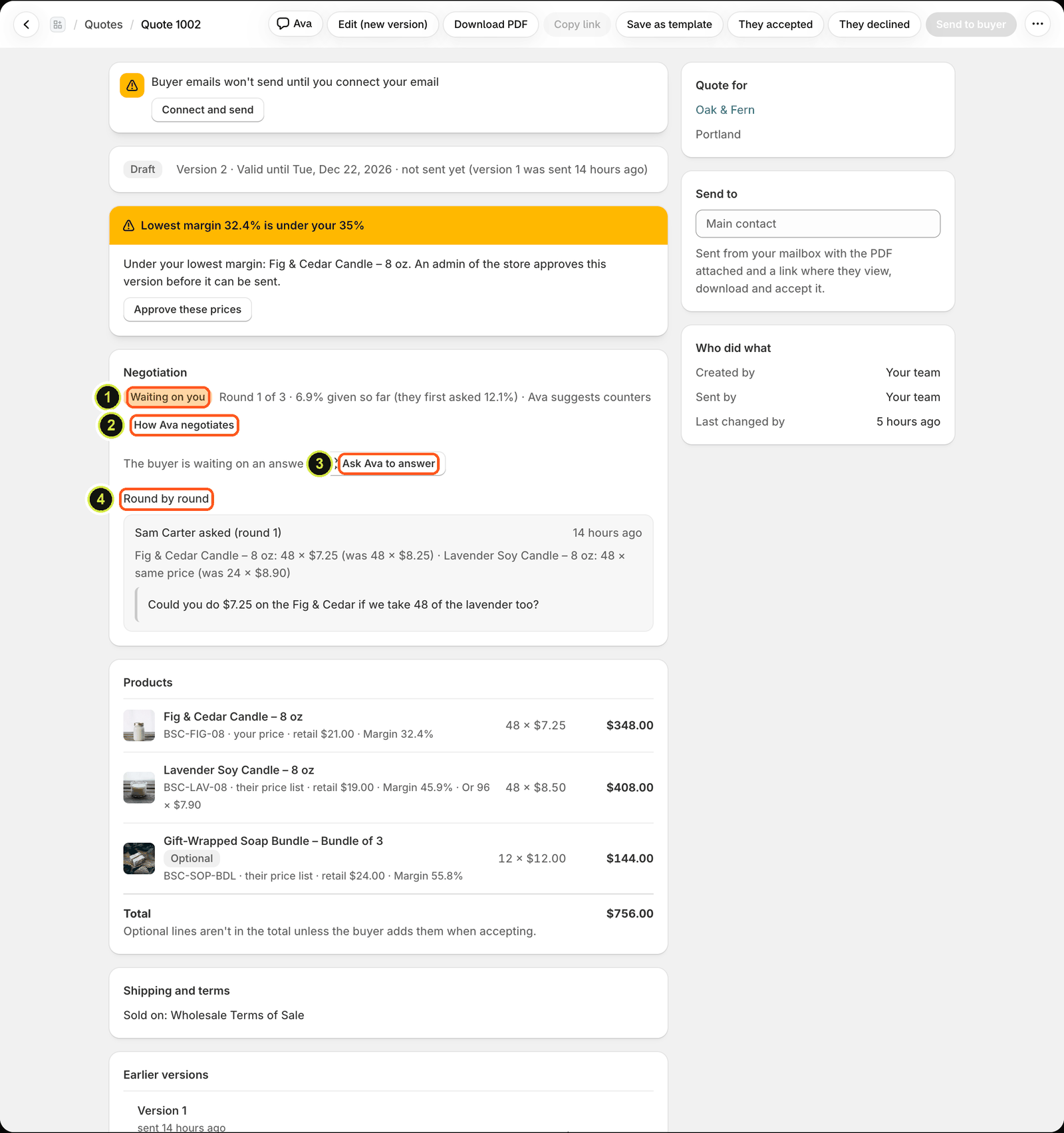 The Negotiation card on a quote: status, round 2 of 3, what was given, Ava's counter and the rounds so far
At the top:
- Status: Waiting on you, Waiting on the buyer, Agreed or Walked away.
- Round 2 of 3: this round against your limit.
- 4% given so far (they first asked 12%): how much you've given compared with what they first asked for.
- Whose rules apply: your store's, or the ones for their customer group or price list.
When her counter is ready
"Ava's counter for Oak & Fern is ready. Check it and send it, or change it first." You see each line with the offer, what they asked and your margin, and the reply that goes with it, which you can change. Add a line to the reply if you like, then:
- Send version 3 sends the counter. A window tells you what goes to whom; confirm to send.
- Change it first opens it as a new version to edit.
- I'll answer myself leaves it to you.
When she asks you
"Oak & Fern's ask goes past how you negotiate, so Ava is asking you:" with the reason, such as "they asked 15% off; you allow up to 8%" or "They asked for other terms (Net 60)". Pick one:
- Send Ava's best counter: the most your rules allow, as a new version.
- Accept their price: a new version at their prices. An admin's answer also approves a price under your lowest margin.
- Keep our price: the current quote goes again, saying these are your best prices.
- I'll answer myself.
Each one asks you to confirm before anything is sent.
Round by round
Below, Round by round lists every step: who acted (the buyer, Ava or someone on your team), the prices on each line, what the buyer asked, the margin, and the rule she applied, for example "Gave 4%: within this round of your ladder" or "No room left: your walk-away price". Show all opens the full history.
Set how Ava negotiates
Go to Quotes and open the Settings tab. Each card saves on its own.
Off, Suggest or Do it
Under Does Ava negotiate?:
- Off: you answer every ask yourself.
- Suggest: she prepares the counter and the reply; you send it.
- Do it: she sends counters within your rules on her own, and asks you about the rest. Turning this on asks you to confirm.
This is the same as the Quote negotiation job in Ava → Rules, where you can add conditions, a daily limit and a top amount. See Your agent's rules.
How Ava negotiates
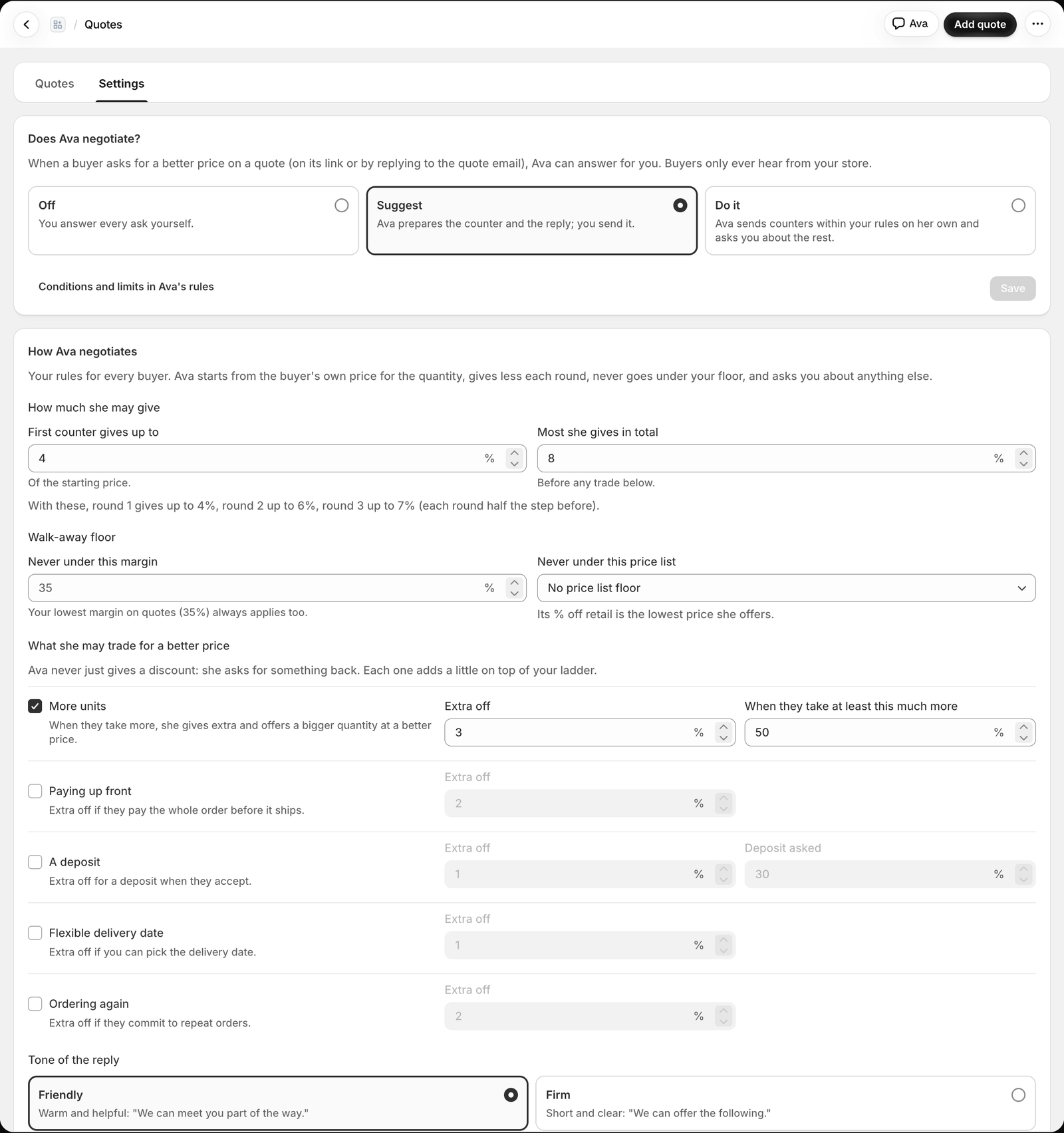 Quotes → Settings, How Ava negotiates: the ladder, walk-away floor, trades, tone and rounds
She starts from the buyer's own price for that quantity and gives less each round.
- How much she may give: First counter gives up to (4% by default) and Most she gives in total (8% by default, before any trade). Each later round gives half the step before, so with the defaults round 1 gives up to 4%, round 2 up to 6%, round 3 up to 7%. The card spells this out for your numbers.
- Walk-away floor: Never under this margin (from each product's cost in Shopify) and Never under this price list. Your lowest margin on quotes always applies too. She never goes under the floor.
- What she may trade for a better price: she never just gives a discount; she asks for something back. Switch on More units (extra off when they take at least a set amount more, plus a bigger quantity offered at a better price), Paying up front, A deposit, Flexible delivery date or Ordering again, each with its own Extra off.
- Tone of the reply: Friendly ("We can meet you part of the way.") or Firm ("We can offer the following.").
- Rounds before a person takes over: after this many asks from the buyer, she asks you (3 by default).
- Never discounted by her: products and collections she never discounts. Any ask on them comes to you.
- Tell Ava how you negotiate: in your own words, for example "be warm with long-time buyers; always ask me about orders over $10,000." She follows it when she writes the reply and asks you when it says so. She never gives more than the numbers above.
Learn from my quotes
Click Learn from my quotes and she looks at this year's quotes where the buyer pushed back, won and lost, and suggests values for your ladder, with what she found ("You won 9 of 14 quotes where the buyer pushed back"). Click Use these values to fill them in, check them, and save. It needs at least 3 decided quotes.
Rules for a customer group or price list
Under For a customer group or price list, click Add rules for a group or price list to give some buyers different rules, for example more room for distributors and less for new buyers. Leave a field empty to use your store's rules. When a buyer is in both, their customer group comes first, then their price list.
What your buyers see
A reply from your store with the new prices, as a new version of the quote, by email. They never see your ladder, your floor or your agent.
Good to know
- Quote numbers on Quotes add a Negotiation part: average rounds, average given against what buyers first asked, your win rate with and without a negotiation, and how many wait on you.
- Ask about a quote. Click Ava on the quote and ask "What price would win this?" She answers with prices for each line within your limits, with the margins. See Message Ava.
- Terms she can't agree to. If a buyer accepts a trade such as paying up front, it comes to you as special terms; set the deposit on the quote yourself.
If something goes wrong
- She asks you about every ask. Check Does Ava negotiate? isn't Off, and that your ladder and floor leave room. With a high margin floor, there may be no room left.
- Learn from my quotes says not enough. It needs at least 3 decided quotes where the buyer pushed back.