
The same product page serves a passer-by, a shop that's thinking of applying, an applicant waiting for your answer and a buyer with their own prices. Who sees what decides what each of them sees and where each click takes them.
Who can do it: an admin.
Go to Wholesale store → Who sees what. Each card saves on its own; the switches under After sign-in apply at once. Changes reach your store within about a minute.
Prices and products
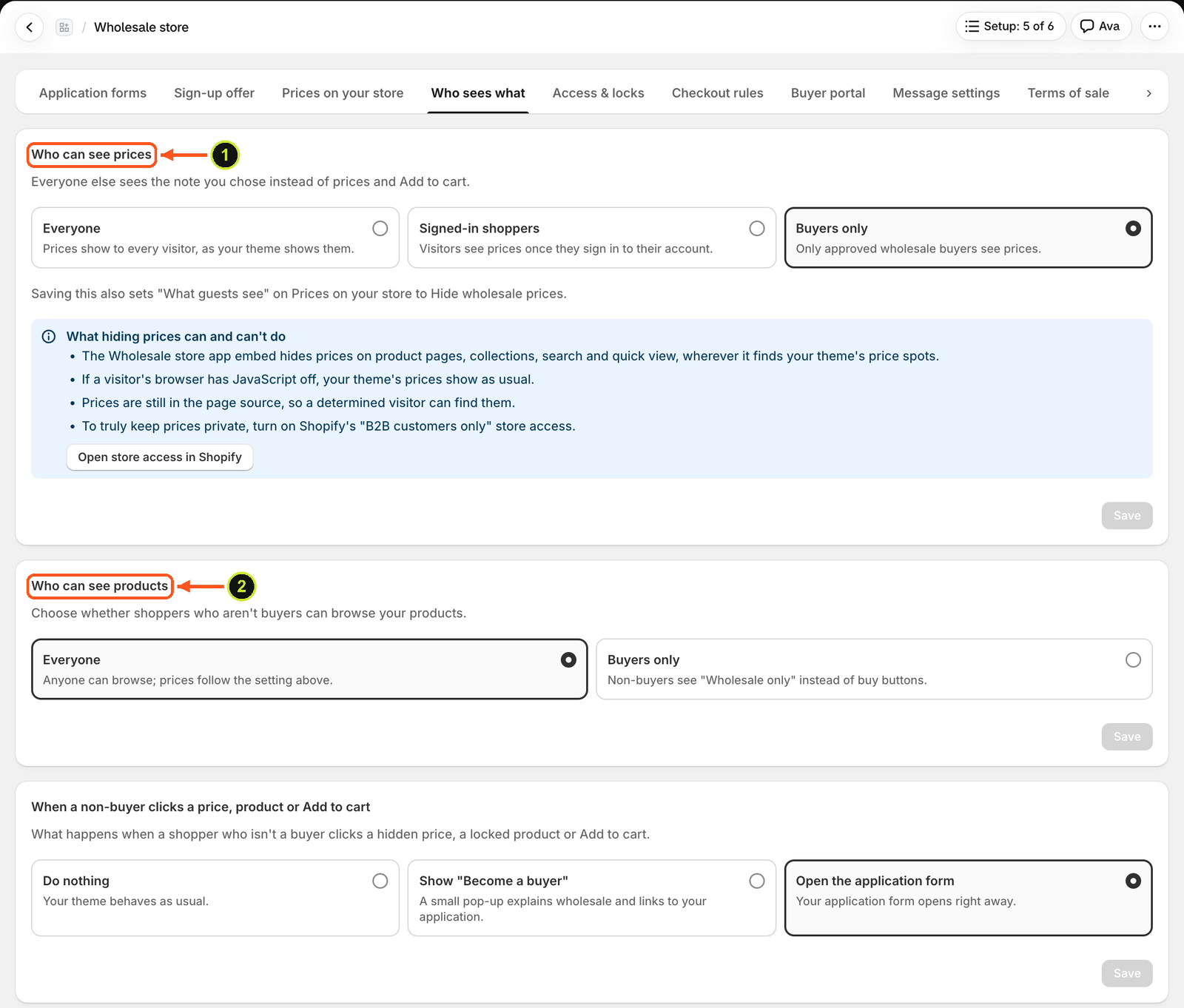 Wholesale store, Who sees what tab: Who can see prices set to Buyers only
- The Who sees what tab.
- Who can see prices: Everyone (your theme as it is), Signed-in shoppers (prices once they sign in) or Buyers only (only approved wholesale buyers see a price; everyone else sees your note instead of the price and Add to cart).
Who can see products: Everyone can browse, or Buyers only: non-buyers see "Wholesale only" instead of buy buttons on every product.
Clicks, sign-in and the order button
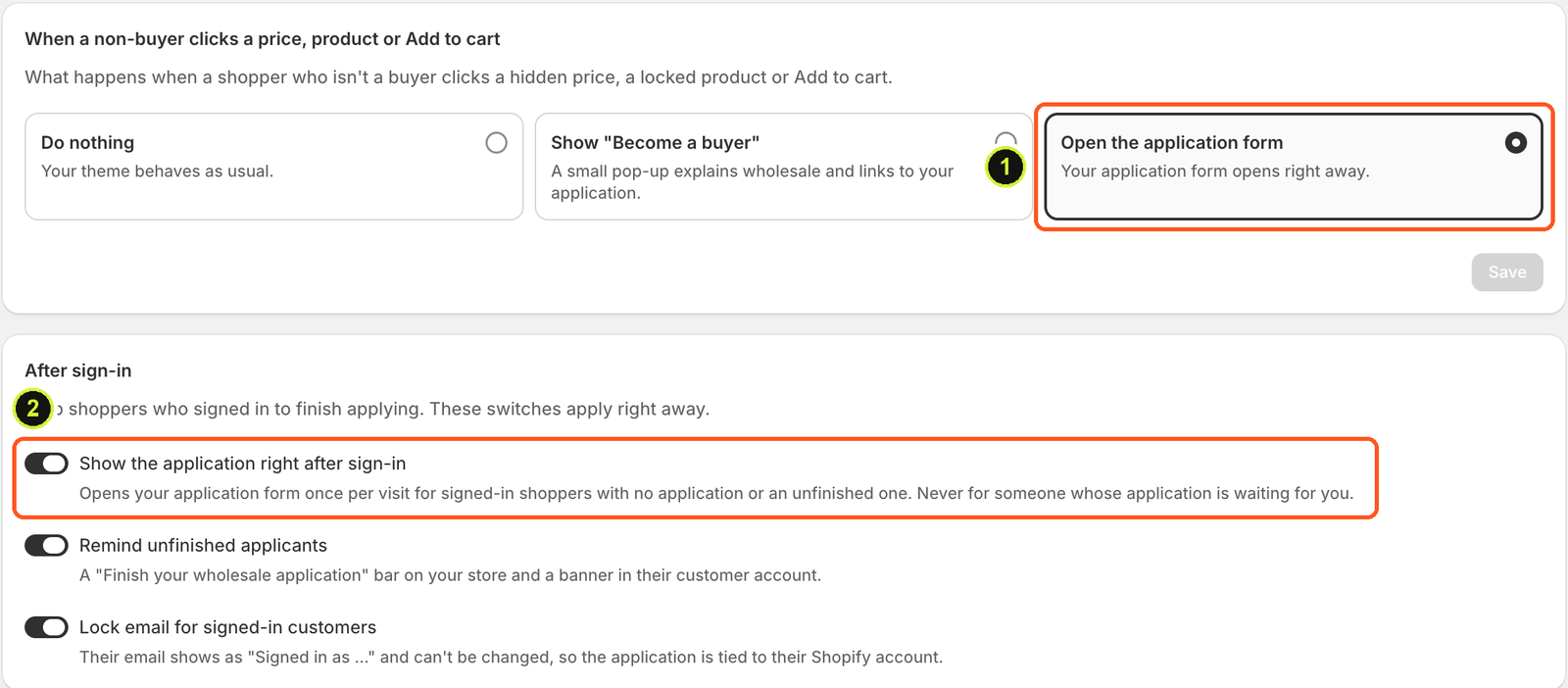 When a non-buyer clicks set to Open the application form, and the After sign-in switches
- When a non-buyer clicks a price, product or Add to cart: Do nothing, Show "Become a buyer" (a small pop-up that explains wholesale and links to your application) or Open the application form. Only where they can't buy.
- After sign-in: Show the application right after sign-in (see Show the application right after sign-in), Remind unfinished applicants, and Lock email for signed-in customers (the form uses their Shopify email, so the application is tied to their account).
Order wholesale button: what it does for an approved buyer: Add to cart, Open the New order page in their account, or Order request form. See The order form and "Order wholesale" button.
Applicants: whether declined applicants may apply again, and the line pending applicants see instead of the apply button (up to 200 characters; empty means "Application received — we'll email you").
What each shopper sees
| Shopper | Prices | Price block and quick order | Order wholesale button |
|---|---|---|---|
| Guest (not signed in) | Hidden with Buyers only or Signed-in shoppers | "Sign in or apply for wholesale prices" with Sign in and Apply for wholesale | Apply for wholesale and a Sign in link |
| Signed in, no application | Hidden with Buyers only | Apply for wholesale prices | Apply for wholesale prices |
| Unfinished application | Hidden with Buyers only | Finish your wholesale application (opens at the step they stopped) | The same |
| Pending (sent, you haven't decided) | Hidden | Your pending line, no apply button | Greyed-out Application received |
| Approved, account not ready yet | Hidden | "You're approved. Your wholesale prices show here once your account is ready." | The same line |
| Buyer (approved, signed in) | Their own price | Their price, retail, volume prices and minimums | What you chose: add to cart, New order page or order form |
A buyer who buys for several locations first sees "Choose the location you're buying for" with a link for each.
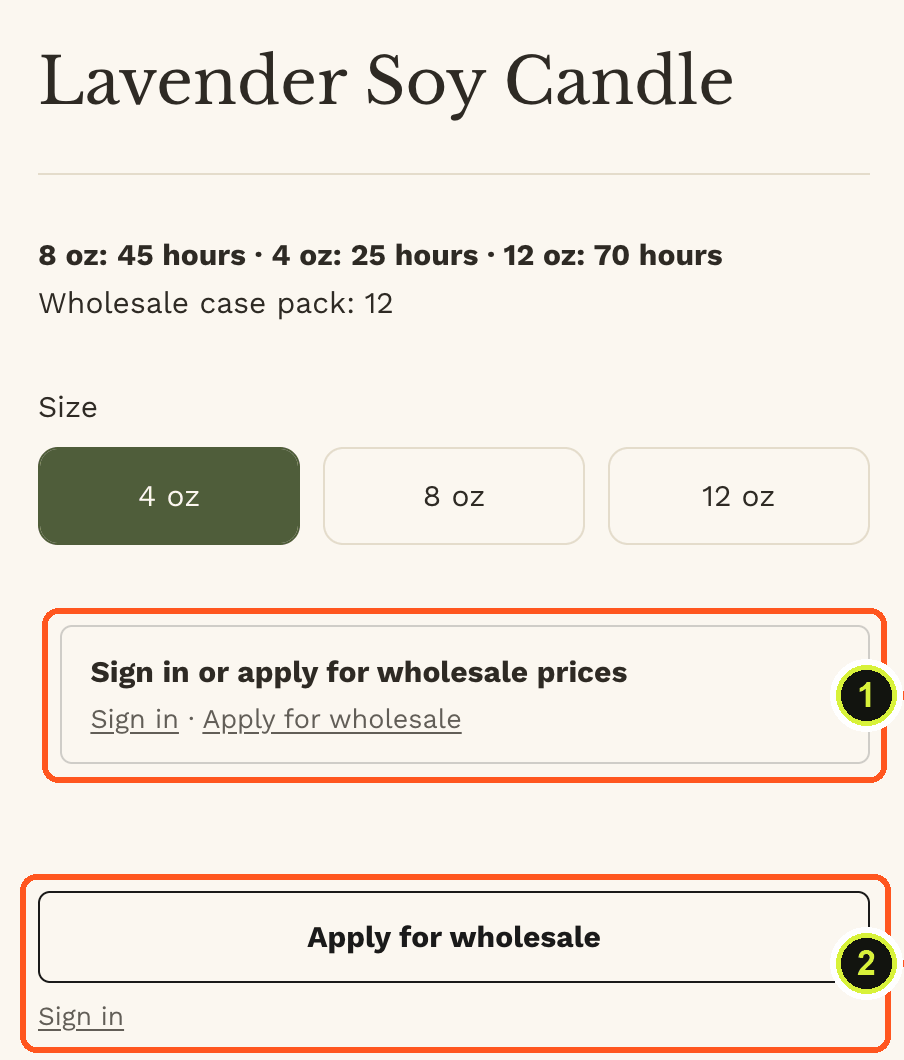 A guest on a product page: Sign in or apply, and Apply for wholesale
- The note a guest sees instead of a price.
- The Order wholesale button, as Apply for wholesale with Sign in under it.
Every Sign in link takes the shopper to Shopify's own sign-in and back to your application form, so someone who creates an account lands straight in it.
What's for show and what's a real lock
| Setting | What it does | Real lock? |
|---|---|---|
| Who can see prices | Hides prices and Add to cart in the page with the app embed | No. Prices are still in the page source and show with JavaScript off |
| Who can see products | Shows "Wholesale only" instead of buy buttons | No. Use the real locks below |
| Shopify's B2B customers only store access | Only signed-in B2B customers get into your store | Yes |
| Locked products with checkout rules on | Checkout refuses locked products for non-buyers | Yes |
| Buyer prices at checkout | Each buyer always pays their own price | Yes |
Hiding products from everyone also hides them from search engines, so keep Who can see products on Everyone unless your whole store is wholesale. See Run a wholesale-only store.
Good to know
- The app embed must be on for any of this to show. See Set up your store for wholesale buyers.
- Where a shopper stands (unfinished, pending, approved) is saved on their Shopify customer, so it shows on every page and in their account.
- Nothing your shoppers see mentions the app or AI. Every word is in your store's name and can be changed.
If something goes wrong
- A change doesn't show: Shopify keeps store pages for up to a minute. Reload after a minute, signed out.
- Pending applicants still see Apply: the application's status reaches your store through their Shopify customer. Check the application in Buyers → Applications has their email or was sent while signed in.